
What Is an AI Writing Tool and How to Use It
An AI writing tool is software that uses artificial intelligence to help draft, edit, or generate text automatically. In controlled tests, one group finished writing tasks about 40% faster, and in another study, guided users cut writing time by 65%.
You probably know the feeling already. The deadline is close, the notes are messy, and the blank document is doing its best impression of a brick wall. That is where an AI writing tool earns its keep, not by replacing your judgment, but by getting words on the page fast enough for you to shape them.
What an AI Writing Tool Actually Does
 A person in a white sweater typing on a silver laptop with a notepad and coffee nearby.
A useful way to think about an AI writing tool is a fast junior assistant who never gets tired of drafts. You hand it a prompt, a few notes, or a rough outline, and it gives you text you can shape into something usable. That can mean a subject line, a blog intro, a rewrite, a summary, or a first pass at something longer.
The biggest confusion is between proofreading tools and drafting tools. Proofreading helps polish what you already wrote. Drafting help gets you moving when you have nothing but a topic and a deadline.
What it changes in real work
In a 2023 controlled experiment, researchers gave ChatGPT to roughly half of 453 college-educated professionals and asked them to complete occupation-specific writing tasks. The group with access finished about 40% faster, roughly 11 minutes sooner, and evaluators rated their work 18% higher in quality, which is a strong sign that AI can help with drafting bottlenecks, not just grammar fixes. MIT News on the writing productivity study
That matters because most writing pain lives in the middle of the process, not at the final typo check. AI can help you turn scattered thoughts into a usable structure, then you decide whether the tone is right, the facts are safe, and the voice still sounds like you.
Practical rule: use AI for the first shape of the text, then edit like a human with taste.
How AI Writing Tools Work Behind the Scenes
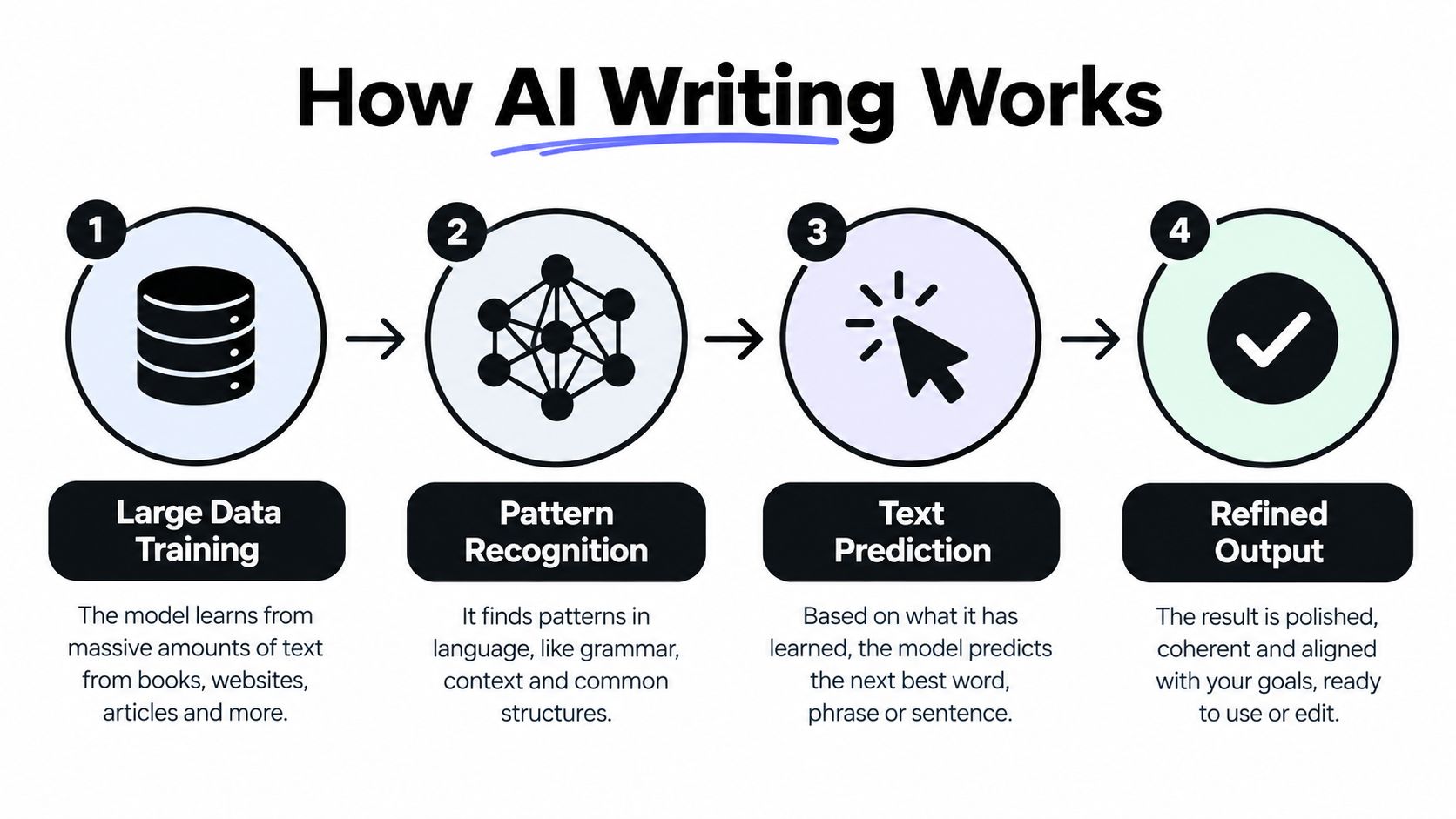 A four-step infographic illustrating how AI writing tools process data to generate refined text outputs.
An AI writing tool learns patterns from huge amounts of text, then predicts what words should come next based on your prompt and context. That sounds abstract, but the everyday version is simple. You give it ingredients, and it assembles a draft using pattern matching, probability, and the instructions you supplied.
The quality of the output depends a lot on the quality of the input. If you write, “make this better,” you'll usually get something vague. If you provide audience, tone, length, purpose, and a few facts, the tool has something concrete to work with.
Why prompts and context matter
Think of a prompt like a recipe card. “Write a bio” is a very thin recipe. “Write a 120-word bio for a freelance designer who works with tech startups, sounds confident but friendly, and mentions motion graphics” gives the tool far more to build from.
That's also why guided use performs better than random prompting. In a spring 2024 Carnegie Mellon study of 27 graduate students, structured instruction helped reduce average writing time by 65%, while quality rose from a B+ to an A. A related report put median research-and-writing time at 150 minutes without AI and 65 minutes with assistance. Carnegie Mellon study summary
Where it goes wrong
AI is strong at generating plausible text, which is not the same as knowing what's true. It can produce smooth wording around a wrong claim, a shaky assumption, or a made-up detail if you let it. That's why the best workflow is structured input, several draft options, and a human pass for voice and accuracy.
If you want a creative-angle example outside ordinary blogging, see this overview of artificial intelligence music composition, where the same drafting logic shows up in a different medium.
Core Features That Make AI Writing Tools Useful
The most valuable features are the ones that remove friction from the actual writing process. Speed matters, but speed alone doesn't tell you much if the output is stiff, off-brand, or hard to edit. A good tool should help you start faster, revise more cleanly, and keep your workflow moving without forcing you to babysit every sentence.
The features that change day-to-day work
Draft generation is the obvious one. It turns a rough idea into a first pass so you're not staring at the cursor. Tone controls matter next, because a newsletter, sales page, and LinkedIn post should not sound like the same robot wrote all three.
Ideation support helps when the problem isn't writing, it's deciding what to say. Revision tools matter when you already have a draft and need it shorter, clearer, or more persuasive. Workflow integration matters if you want the tool to fit into your CMS, docs app, or publishing stack instead of living in a separate tab you forget to open.
What to test before you pay
The key lesson from professional-writing research is simple. Faster first drafts are useful, but the core question is whether the output still helps a human finish the job well. That's why a tool should be judged on both speed and usefulness, not just on how quickly it spits out text. The same idea applies to scripting tools for business video content, because a fast draft only helps if it still fits the channel and the audience.
| Feature | What It Changes | When It Matters Most | Quick Test |
|---|---|---|---|
| Draft generation | Gets words on the page | Blank-page starts | Ask for a 3-paragraph intro from a messy brief |
| Tone control | Makes the output sound on-brand | Public content and client work | Compare casual, formal, and punchy versions |
| Rewrite support | Improves an existing draft | Editing and polishing | Paste a weak paragraph and ask for a tighter version |
| Idea generation | Expands angles and hooks | Brainstorming | Ask for five titles with different emotional tones |
| Workflow fit | Saves switching time | Daily production use | Try the tool inside your normal writing stack |
Real-World Use Cases and Practical Examples
A lot of people overcomplicate AI writing. The simplest approach is to match the tool to the task, then keep the human part focused on judgment. That is usually better than asking one prompt to do everything.
Short professional writing
A manager needs a customer update. The input is a few bullet points, the target reader, and the tone. The tool generates two or three versions, and the manager keeps the clearest one, trims the fluff, and checks that no promise was exaggerated.
A student or researcher can use the same structure for drafting notes or reorganizing material. The trick is to treat the tool like a drafting partner, not an authority. For public-facing claims, factuality matters more than style, which is why systems need a grounding layer when they make statements about real people or events. The FACTS Grounding benchmark evaluates long-form output against a supplied document, with source contexts up to 32,000 tokens, and requires the answer to stay grounded in that material. FACTS Grounding benchmark reference
Creative and entertainment workflows
For performance-style content, the workflow changes a bit. Creators often need structured inputs like target, relationship, inside jokes, style tags, and intensity, then several draft candidates before they pick a final version. That matters because one first draft rarely nails voice, rhythm, and comedic timing on the first try. If you work in that space, a tool like the rap lyrics AI generator is a better fit than a generic writing assistant because it is built around lyrical structure.
Keep the fun in the draft, but keep the final say in your hands.
Public posting and distribution
Once the content is going public, the bar changes again. A post can be funny in private and risky in public if it exposes private details or sounds like harassment. That's where an automated publishing workflow guide can be useful, especially if you want a cleaner path from draft to scheduled content without losing control over the final review.
Benefits, Risks, and Common Misconceptions
The biggest benefit is obvious, it saves time. The less obvious benefit is that it can make weaker writers more productive by helping them move from idea to draft without getting stuck. The research also suggests that quality can improve when the tool is used well, not just when it is used quickly.
The upside and the catch
Recent U.S. workplace data found AI use rose from 40% to 45% of employees between the second and third quarters of 2025, and among users, 42% used it to consolidate information, 41% to generate ideas, and 36% to write or edit. A separate 2025 survey found writing assistance was one of the most common uses at 35.4%, while trust and privacy stayed major concerns. Gallup workplace AI report
That lines up with how creators use these tools. They want speed, but they also want control. If the output sounds generic, misses the audience, or invents details, the time saved gets erased in the edit.
Common myths to drop
Myth 1, AI replaces writers. No. It changes the first draft process and shifts the value toward editing, selection, and judgment.
Myth 2, AI is always accurate. It isn't. Smooth writing can still contain shaky claims.
Myth 3, AI detectors solve trust. They don't. Detection is not proof, and it's a weak substitute for process and documentation. AI detector accuracy explained
| Benefit | Typical Risk | Mitigation Hint |
|---|---|---|
| Faster drafting | Generic tone | Add audience, format, and style constraints |
| Easier ideation | Weak originality | Ask for multiple angles, then rewrite manually |
| Better accessibility | Overreliance on automation | Keep human review in the loop |
| Faster editing | Silent factual errors | Verify claims before publication |
Privacy, Ethics, and Responsible Use Practices
The most responsible way to use an AI writing tool is to treat it like a drafting system, not a truth machine. That matters most when the text involves people, reputations, private details, or public publication. If the content can affect someone's real life, the process around it matters as much as the final wording.
What to keep track of
The main gap in a lot of AI writing advice is provenance, meaning where the text came from and how it was shaped. Guidance from the EUIPO recommends documenting the tool and version, how it was used, how much it contributed, and how the output was verified. EUIPO guidance on GenAI and copyright
That sounds bureaucratic until you need it. A short generation log can help you remember what was human-written, what was rewritten, and what was generated from scratch. It also makes it easier to explain your process if a collaborator, client, or editor asks.
A simple responsible-use checklist
- Keep private notes private: Do not paste sensitive personal or workplace details unless you need them for the task.
- Separate facts from wordplay: A joke can be fictional. A claim about a real person should be verified.
- Disclose meaningful AI use: If the tool shaped the structure or wording in a major way, say so.
- Save the edit trail: Keep the prompt, draft, and final version for your own records.
- Review before publishing: Check for defamation, harassment, or accidental disclosure.
For creators dealing with music or performance content, this question comes up fast. A practical discussion of ownership and publishing boundaries is in this guide on whether you can publish a song written by AI.
If the output would be risky to say out loud in public, it probably needs another review.
How to Choose the Right AI Writing Tool
Start with your actual use case, not the marketing page. A tool that's great for marketing copy can feel clumsy for fiction, and a creative writing tool can feel awkward for structured business content. The right choice depends on the kind of text you make most often, how private the work is, and how much control you want over revisions.
Match the tool to the job
If you need occasional drafting help, a general-purpose assistant may be enough. If you publish often, look for tools that support style, structure, and editing without forcing you into a separate workflow. If you work with sensitive or public-facing content, privacy controls and documentation features matter more than flashy templates.
The most common mistake is choosing the tool that looks smartest in a demo instead of the one that fits your real process. Another mistake is ignoring the cost structure until the bill lands. A tool that feels cheap at first can get expensive if it charges by volume, seats, or advanced features you rely on every day.
A simple trial routine
- Run one real task. Use your own topic, not a toy prompt.
- Compare the first draft. Look at clarity, tone, and how much editing it needs.
- Check control and trust. See whether you can revise, document, and verify the output easily.
 A digital tablet displaying a product comparison chart beside a notebook, pen, and a small potted plant.
Red flags: vague privacy language, no revision controls, claims of perfect accuracy, or promises that the tool will “replace your writer.”
Putting It All Together and Next Steps
An AI writing tool is most useful when it helps you move from idea to draft faster, while you keep control over voice, truth, and final polish. The best workflow is still simple, structured input, several draft options, and a human editor who knows what should stay and what should go. That combination is what turns AI from a novelty into a practical part of the creator stack.
The next step is not to chase every shiny tool. Pick one that matches your main use case, test it on a real task, and pay attention to how much fixing the output needs. If it saves time without forcing you to fight the draft, it's doing its job.
Use the tool with boundaries, too. Keep a generation log, decide what you'll disclose, and treat public content with more care than private experimentation. That keeps your process clean and your publishing decisions easier later.
DissTrack AI helps creators generate personalized roast lyrics from structured inputs like a target, relationship, style, and intensity, then refine the result before sharing. If you want to see how that kind of controlled AI writing fits a creator workflow, visit DissTrack AI and try it for yourself.